


Harris Teeter
4.33.60K Reviews
App Specs
- Version
- 97.2
- Updated On
- License
- Free
- Downloads
- 1,000,000+
- Developer
- The Kroger Co.
- Categories
- Food & Drink
- Platform
- Android, iOS
Screenshots
 Analysis by AppCompare
I usually reach for Harris Teeter when the goal is to turn a loose grocery list into a planned pickup or delivery, rather than make an unplanned trip and hope the shelves have what I need. That shift matters most on a busy week: I can think through meals, build a basket in advance, and choose how the order gets to me. It is a free food-and-drink app from The Kroger Co., rated for Everyone, and its average rating is 4.4 from around 10,000 ratings. Those figures suggest a well-used service, but the practical question is whether its shopping flow fits your routine.
Start with the list, not the aisle
The most useful way to approach a grocery app is to begin with what you actually need at home. I’d check the fridge and pantry first, then make a rough list by meal or household need before opening the catalog. That small bit of preparation makes browsing less tempting and helps keep the cart focused. It is especially useful when you are shopping for several days rather than just grabbing a couple of forgotten items.
For example, if I am planning a few dinners, I can search for the main ingredients, then remember the supporting items—such as a side, breakfast staples, or something for lunches—before checkout. A digital cart is easy to keep editing, but that convenience can also make it easy to add extras. Treating the list as a plan, rather than browsing without a target, makes the app more useful as a budgeting aid.
How I’d build a practical basket
Once I have a list, I would search for the items that are specific to a recipe and browse categories for the more familiar basics. That gives me a better balance than relying on either method alone: search can get me to a known product quickly, while categories can help when I need to explore what is available. The published app experience also includes barcode scanning, which can be handy in a different situation: when you are already in a Harris Teeter store, scanning an item can help you look for a similar product online instead of trying to describe the package from memory.
I would review the basket before moving on, especially if a recipe depends on a particular ingredient or size. A shopping app can make it quick to add something, but the final list still deserves a human check. One useful habit is to compare the cart against the meal plan once more, then check the weekly deals section for offers that fit the list. I would not change a meal just because a promotion appears; the better value is a discount on something I was already going to buy.
Choose the handoff that fits the day
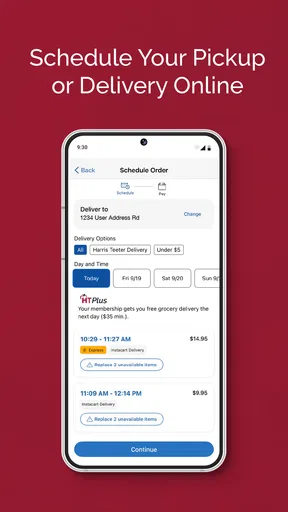
After the cart is ready, the next decision is whether to collect it curbside or have it delivered. I see curbside as the better fit when I will already be near the store, want to keep the handoff simple, or need to work the collection into a trip I am making anyway. Home delivery is more convenient when leaving the house is the part I am trying to avoid. The app’s central benefit is that both options fit into the same shopping process instead of requiring me to rebuild the basket elsewhere.
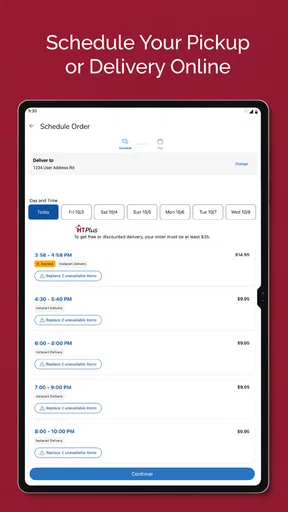
Scheduling is part of that handoff, so I would choose a time that leaves a little room in the day rather than planning around an overly tight gap. A grocery order is only convenient if I can actually be present for the pickup or delivery. Before confirming, I’d also make sure the selected option suits the way I can receive the order; for example, curbside is less useful if I cannot get to the store during the chosen window.
Worth Reading Before You Choose

EA SPORTS FC Mobile 26 Is a Bigger Football Game, but It Takes Time

Flipboard Shows What News Apps Must Do Beyond the Feed

Switching to Android Auto Means Rethinking Your Driving Routine

Google Calendar Makes a Crowded Week Easier to Manage

Ludo King Makes the Most of the Minutes Between Plans

Baby Panda World Brings Quick Play to Modern Phones, but Its Game Library Feels Busy
Where loyalty and history help
The app also brings the VIC rewards program into the shopping routine. If you already use a VIC card, linking it can keep rewards connected to purchases without carrying the card as a separate step. I find that most useful when shopping regularly, because a benefit that is easy to use is more likely to become part of the normal checkout habit. The app also keeps purchase history, which can help with repeat orders and give you a starting point for a new list.
History is useful, but I would treat it as a shortcut rather than a complete shopping plan. It can remind me which staples I tend to buy, while a fresh check of the kitchen prevents me from ordering duplicates. For a household with repeating weekly needs, that combination—past purchases plus a quick inventory check—can cut down on list-making without turning every order into an automatic repeat.
Getting Started with Harris Teeter
First things first, downloading the Harris Teeter app was a breeze. It's available on both Android and iOS, so no worries there. The installation process was straightforward, and within minutes, I was all set to dive in.
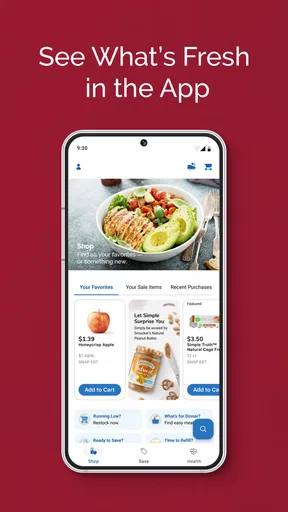
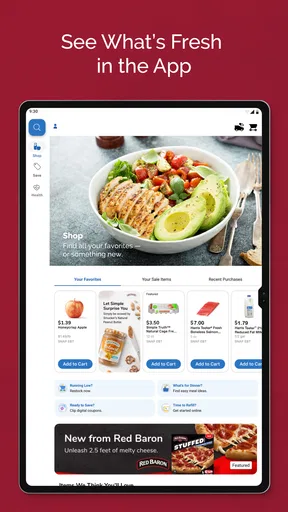
The app greets you with a clean, user-friendly interface. Everything is laid out intuitively, making it easy even for those who might not be so tech-savvy. I appreciated the minimalistic design that didn’t overwhelm me with unnecessary graphics or ads. It's all about getting you to what you need as efficiently as possible.
Shopping Made Easy
Now onto the good stuff—shopping! The search functionality is robust. You can find products by typing in keywords or scanning barcodes, which is a nifty feature when you're in the store and need to quickly find a similar product online. The categories are well-organized, so browsing is a cinch. I found everything from fresh produce to household essentials with just a few taps.
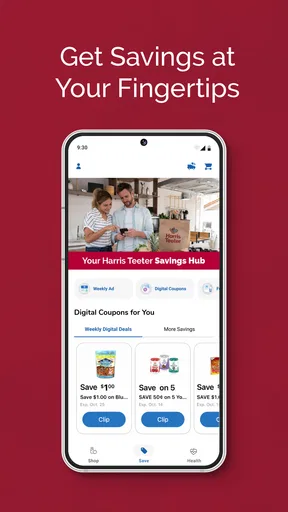
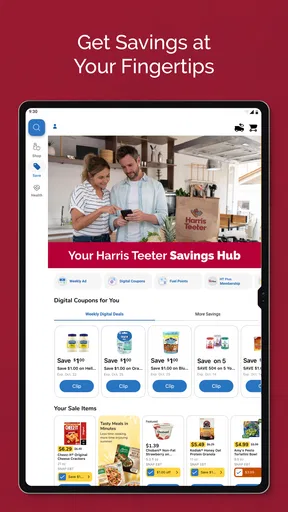
Adding items to my cart was as smooth as butter. And here’s a little tip: make sure to check out the weekly deals section. Who doesn’t love a good bargain? The app highlights all ongoing promotions, so you won’t miss out on the best prices.
Order and Delivery Options
Once I had my cart filled with goodies, it was time to check out. The app offers multiple pickup and delivery options. You can choose curbside pickup, which is great if you’re in a rush, or opt for home delivery if you prefer the groceries to come to you.
Scheduling was flexible. I could pick a time slot that suited my schedule, and voilà, my groceries were delivered right to my doorstep. The delivery was prompt, and everything arrived in perfect condition. It's like having your personal shopper without the extra cost.
Loyalty and Rewards
If you’re a regular Harris Teeter shopper, you’ll love the integration of their VIC rewards program within the app. Linking my VIC card was easy, and I started earning points on every purchase. Redeeming rewards is hassle-free, making the whole shopping experience even more rewarding.
Additionally, the app keeps track of your purchase history, which is super helpful for budgeting and meal planning. You can easily reorder past items or use your history to create new lists.
A Few Final Thoughts
For a practical weeknight scenario, imagine getting home late, realizing breakfast supplies are low, and wanting to avoid another store trip. I would use the app to check the basics against what is already in the kitchen, add only the missing items, then compare the finished cart with the next few meals. If I can collect the order while passing the store, curbside makes sense; if that would add another stop to an already crowded day, delivery is the more appealing handoff. The useful part is not just placing an order, but choosing a route from list to groceries that matches the day I am having.
This workflow is strongest for people who shop at Harris Teeter often enough to recognize the products and make use of VIC rewards and purchase history. It can also suit parents, caregivers, and anyone coordinating groceries around work or other errands: one person can prepare the list, then the person handling pickup can follow the same order. That handoff works best when the basket is reviewed carefully beforehand, since a vague list or last-minute change can create confusion for whoever collects it.
Compared with walking into a store and choosing everything yourself, ordering through the app trades browsing freedom for advance planning and a more predictable errand. Compared with a general grocery marketplace, its natural advantage is keeping the experience centered on Harris Teeter’s own shopping and rewards routine. The trade-off is just as important: if you mainly shop at another chain, or want to compare a wide range of retailers in one place, a multi-store service may be a better fit. I would not use this as a substitute for every kind of grocery trip; it is most compelling when Harris Teeter is already where you prefer to shop.
There are a few decisions I would make before relying on it for a time-sensitive meal. First, browse and build the cart early enough to choose a handoff that works, rather than assuming the most convenient time will suit your schedule. Second, check the final basket against your recipe and pantry; a past order is a reminder, not proof that you still need the same things. Third, treat weekly deals as a way to save on planned purchases, not a reason to buy something that will sit unused. These habits make the digital convenience more dependable without pretending the app can do the thinking for you.
The main limitation is that ordering groceries remotely involves more trust than selecting each item yourself. If you want to inspect produce, compare packaging in person, or choose exact substitutes as you shop, an ordinary store visit gives you more direct control. And if you need a single item immediately, opening the app, building a basket, and coordinating pickup or delivery may be more effort than simply stopping in. I would also avoid planning a meal around an item until I have checked the cart and am comfortable with the order; the app makes shopping easier, but it does not remove the need to verify what you are asking for.
People often wonder whether the app is useful without being a frequent shopper. It can still help with a one-off pickup or delivery, but the rewards and purchase-history shortcuts become more valuable with repeated use. If you do not use VIC, the ordering workflow may still be the main attraction, while regular customers have more reason to keep their shopping history and offers in the same place. Another practical question is whether it is suitable for a household shared by several people: it can support a coordinated order when one person prepares the basket and communicates the pickup plan, though the group should agree on the list before checkout rather than assuming everyone’s needs are covered.
The app is free, has been available since March 8, 2011, and its current version is 95.0. It has more than one million installs and around 3,600 written reviews, which gives a sense of its established audience without guaranteeing that every order will suit every shopper. It supports devices running Android 8.0 or later. I would check that requirement before downloading on an older Android phone, and choose the iOS version if I use an Apple device.
Overall, the Harris Teeter app is a game-changer for anyone looking to streamline their grocery shopping. It's convenient, efficient, and packed with features that cater to modern shoppers' needs. Whether you're juggling a busy lifestyle or just want to optimize your grocery runs, this app is worth a try.
So next time you're prepping for a shopping trip, or just want to avoid the chaos of weekend grocery rushes, give the Harris Teeter app a whirl. It might just become your new favorite shopping companion. Happy shopping!
Pros
- User-friendly interface and design.
- Wide selection of groceries available.
- Convenient online ordering system.
- Loyalty rewards and discounts offered.
- Real-time stock updates.
Cons
- Some features require account creation.
- Occasional bugs in the app.
- Limited payment options.
- Delivery times can vary.
- Not all locations covered.
FAQs for Harris Teeter
What features does the Harris Teeter app offer?
The Harris Teeter app provides a range of features to enhance your shopping experience. Users can access weekly ads, digital coupons, and personalized savings. The app also allows you to create shopping lists, view product details, and check item availability. Additionally, you can manage your e-VIC account and find store locations easily.
Is the Harris Teeter app available for both Android and iOS devices?
Yes, the Harris Teeter app is available for download on both Android and iOS platforms. Users can find it on the Google Play Store for Android devices and the Apple App Store for iOS devices, ensuring a seamless experience regardless of your smartphone preference.
How do I use digital coupons with the Harris Teeter app?
Using digital coupons with the Harris Teeter app is straightforward. After downloading the app, sign in to your account and browse available coupons. Simply click to load the coupons to your e-VIC account. At checkout, provide your VIC card number to automatically apply the savings to your purchase.
Can I order groceries through the Harris Teeter app?
Yes, the Harris Teeter app allows you to order groceries online for delivery or pickup. You can browse the full inventory, add items to your cart, and choose your preferred shopping method. This feature is designed to make grocery shopping convenient and time-efficient for all users.
Are there any costs associated with using the Harris Teeter app?
The Harris Teeter app is free to download and use. However, fees may apply for certain services like grocery delivery. It’s advisable to check for any additional service fees during your online checkout process to avoid unexpected charges.


